


Flow Compiler#
The Flow Compiler lets you describe multi-actor pipelines as familiar Python
code. The compiler transforms your Python into a flat graph of standard
AsyncActor resources — no new abstractions, no Flow CRD, no runtime
dependency.
Write Python, deploy actors#
A flow is a Python function that calls other actors:
async def pipeline(payload):
    enriched = await enrich(payload)
    if enriched["needs_review"]:
        result = await human_review(enriched)
    else:
        result = await auto_process(enriched)
    return await summarize(result)
The compiler reads this function and produces a set of router actors that replicate the control flow using message passing.
The compiler also generates a visual graph of the compiled pipeline:
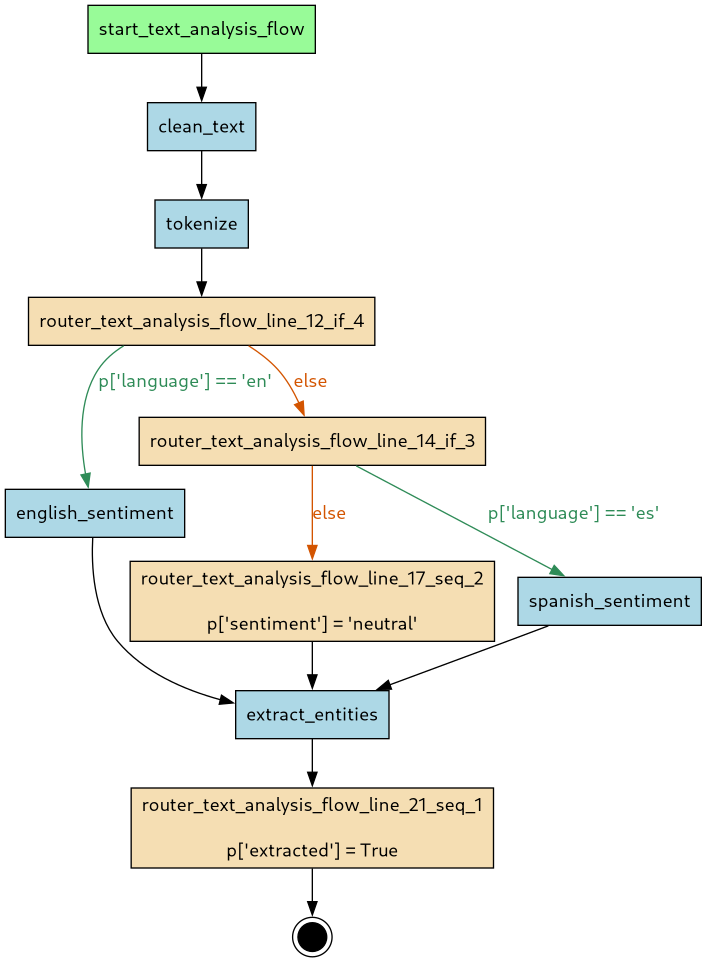
Green = actor handlers (your code).
Orange = auto-generated routers.
Blue = entrypoint/exitpoint.
How it works: CPS transformation#
The compiler uses continuation-passing style (CPS): instead of calling the next function, each step sends a message to the next actor's queue. Branches become conditional route rewrites. Sequential calls become chained routes.
The output is a set of standard AsyncActor manifests linked by an
asya.sh/flow label. There is no Flow CRD — flows are just actors.
Supported control flow#
| Python construct | Mesh equivalent |
|---|---|
| Sequential calls | Chained routes |
if/elif/else |
Conditional route rewrite |
while / while True with break |
Loop-back edges with exit conditions |
payload["results"] = [x for x in payload["items"]] |
Fan-out with automatic fan-in |
asyncio.gather(a, b) |
Fan-out with automatic fan-in (for asyncio flows) |
try/except |
Error routing to recovery actors |
with asyncio.timeout() |
SLA-bounded execution |
@tool-decorated functions |
Adapter generation for non-standard signatures |
Flows vs standalone actors#
Flows compile to standard actors, but the compiler enforces 1:1 payload mapping — each actor call takes one payload and returns one payload. This keeps the compiled graph predictable and debuggable.
For advanced patterns that break this contract, use standalone generator actors directly:
| Pattern | Flow | Standalone actor |
|---|---|---|
| Sequential, branching, loops | ✅ | ✅ |
| Early return | ✅ | ✅ |
| Fan-out / fan-in | ✅ | ✅ |
| Fire-and-forget fan-out (multiple yields) | use actor | ✅ |
| Streaming events (FLY) | use actor | ✅ |
Tool adapter generation#
External frameworks like Claude Agent SDK and LangChain define functions with
typed signatures (get_weather(city: str) -> dict) rather than Asya's
dict -> dict protocol. The compiler bridges this gap automatically.
When a @tool-decorated function is called with non-standard arguments:
from claude_agent_sdk import tool

@tool
async def get_weather(city: str) -> dict: ...

@flow
async def my_flow(p: dict) -> dict:
    p["weather"] = await get_weather(p["city"])
    return p
The compiler generates an adapter file that wraps the function:
async def adapter_get_weather(payload: dict):
    _result = await get_weather(payload["city"])
    payload["weather"] = _result
    yield payload
The adapter is deployed as a separate actor, bridging the tool's typed interface
with the envelope protocol. The @tool decorator is automatically stripped at
runtime via ASYA_IGNORE_DECORATORS.
Built-in rules support claude_agent_sdk.tool, langchain.tools.tool, and
langchain_core.tools.tool. Custom tool decorators can be added via
compiler rules.
See examples/flows/tool_adapter.py
for a working example with compiled output in
examples/flows/compiled/tool_adapter/.
Purely additive#
The flow compiler is a build-time tool. It generates standard actors that run on the standard mesh. Removing the compiler does not affect already-deployed flows. No runtime component is added.
Further reading#
- Flow DSL specification — syntax rules, compilation semantics, edge cases
- Flow Compiler component — CLI usage, output formats
- Your first flow — step-by-step tutorial