Build and deploy your first Asya actor.
What You'll Learn
- Write pure Python handlers (functions or classes) for ML pipelines
- Test handlers locally and package them in Docker images
- Deploy actors using AsyncActor CRDs with autoscaling
- Use Flow DSL to build multi-step pipelines with conditional routing
- Handle dynamic routing with envelope mode for AI agents
Overview
As a data scientist, you focus on writing pure Python functions. Asya handles infrastructure, routing, scaling, and monitoring.
Core pattern: Mutate and enrich the payload - not request/response. Each actor adds its results to the payload, which flows through the pipeline. See payload enrichment pattern for more details.
Write a handler function or class:
# handler.py
def process(payload: dict) -> dict:
    # Your logic here <...>
    result = your_ml_model.predict(payload["input"])

    # Recommendation: enrich payload, don't replace it
    return {
        **payload,            # Keep existing data
        "prediction": result  # Add your results
    }
That's it. No infrastructure code, no decorators, no pip dependencies for queues/routing.
Function Handler
# preprocessor.py
def process(payload: dict) -> dict:
    text = payload.get("text", "")
    return {
        **payload,  # Preserve input
        "cleaned_text": text.strip().lower(),
        "word_count": len(text.split())
    }
Class Handler
Class handlers allow stateful initialization - perfect for loading models once at startup:
# classifier.py
class TextClassifier:
    def __init__(self, model_path: str = "/models/default"):
        # Loaded once at pod startup, not per message
        self.model = load_model(model_path)
        print(f"Model loaded from {model_path}")

    def process(self, payload: dict) -> dict:
        text = payload.get("cleaned_text", "")
        prediction = self.model.predict(text)

        # Add classification results to payload
        return {
            **payload,  # Keep preprocessor results
            "category": prediction["category"],
            "confidence": prediction["score"]
        }
IMPORTANT: All __init__ parameters must have default values:
# ✅ Correct
def __init__(self, model_path: str = "/models/default"):
    ...

# ❌ Wrong - missing default
def __init__(self, model_path: str):
    ...
Abort Execution
If an actor needs to stop processing of current payload, it should return None:
def process(payload: dict) -> dict | None:
    # Skip processing if already done
    if payload.get("already_processed"):
        return None  # Routes to happy-end, no further processing

    # Normal processing - sent to the next actor
    return {**payload, "result": "..."}
Local Development
1. Write Handler
# text_processor.py
def process(payload: dict) -> dict:
    text = payload.get("text", "")
    return {
        **payload,
        "processed": text.upper(),
        "length": len(text)
    }
2. Test Locally
# test_handler.py
from src.text_processor import process

payload = {"text": "hello world", "request_id": "123"}
result = process(payload)
assert result == {
    "text": "hello world",
    "request_id": "123",  # Original data preserved
    "processed": "HELLO WORLD",
    "length": 11
}
No infrastructure needed for testing - pure Python functions.
3. Package in Docker
Note: CI/CD is out of scope of Asya🎭 framework - ask your platform team for support. For now let's assume that your code can be built into docker images, which are accessible by the Kubernetes cluster.
FROM python:3.13-slim

WORKDIR /app
COPY text_processor.py /app/

# Install dependencies (if any)
# RUN pip install --no-cache-dir torch transformers

CMD ["python3", "-c", "import src.text_processor; print('Handler loaded')"]
docker build -t my-processor:v1 .
Deployment
Platform team provides cluster access. Your code will be deployed as AsyncActor CRD.
⚠️ We're planning to support via a CLI tool to easy deploy, debug and maybe even build actors to Kubernetes.
Click to see AsyncActor YAML (usually managed by platform team)
apiVersion: asya.sh/v1alpha1
kind: AsyncActor
metadata:
  name: text-processor
spec:
  transport: sqs       # Ask platform team which transport is supported
  scaling:
    minReplicas: 0     # Scale to zero when idle
    maxReplicas: 50    # Max replicas
    queueLength: 5     # Messages per replica
  workload:
    kind: Deployment
    template:
      spec:
        containers:
        - name: asya-runtime
          image: my-processor:v1
          env:
          - name: ASYA_HANDLER
            value: "src.text_processor.process"  # module.function
          # For class handlers:
          # value: "src.text_processor.TextProcessor.process"  # module.Class.method
kubectl apply -f text-processor.yaml
Asya automatically injects:
- Sidecar for routing and transport
- Runtime entrypoint for handler loading
- Autoscaling configuration (KEDA)
- Queue creation (SQS/RabbitMQ)
Using MCP Tools
If platform team deployed the gateway, use asya mcp CLI tool:
# Install asya-cli
pip install git+https://github.com/deliveryhero/asya.git#subdirectory=src/asya-cli

# Set gateway URL (ask platform team)
export ASYA_CLI_MCP_URL=http://gateway-url/

# List available tools
asya mcp list

# Call your actor
asya mcp call text-processor --text="hello world"
Output:
[.] Envelope ID: abc-123
Processing: 100% |████████████████| , succeeded
{
  "result": {
    "text": "hello world",
    "processed": "HELLO WORLD",
    "length": 11
  }
}
Class Handler Examples
LLM Inference
# llm_inference.py
class LLMInference:
    def __init__(self, model_path: str = "/models/llama3"):
        # Load model once at startup
        self.model = load_llm(model_path)
        print(f"Loaded LLM from {model_path}")

    def process(self, payload: dict) -> dict:
        prompt = payload.get("prompt", "")
        response = self.model.generate(prompt, max_tokens=512)

        return {
            **payload,  # Keep all previous data
            "llm_response": response,
            "model": "llama3"
        }
Deployment:
env:

- name: ASYA_HANDLER
  value: "llm_inference.LLMInference.process"
- name: MODEL_PATH
  value: "/models/llama3"  # Passed to __init__
Image Classification
# image_classifier.py
class ImageClassifier:
    def __init__(self, model_name: str = "resnet50"):
        import torchvision.models as models
        self.model = models.__dict__[model_name](pretrained=True)
        self.model.eval()

    def process(self, payload: dict) -> dict:
        image_url = payload.get("image_url")
        image = load_image(image_url)
        prediction = self.model(image)

        return {
            **payload,
            "predicted_class": prediction.argmax().item(),
            "confidence": prediction.max().item()
        }
Deployment with GPU:
resources:
  limits:
    nvidia.com/gpu: 1
env:

- name: ASYA_HANDLER
  value: "image_classifier.ImageClassifier.process"
- name: MODEL_NAME
  value: "resnet50"
Flow DSL: Simplified Pipeline Authoring
Use case: Define multi-actor pipelines in Python instead of manually managing routes and deployments.
The Flow DSL compiler transforms Python workflow descriptions into router-based actor networks, automating route management and deployment configuration.
Writing a Flow
Flows are Python functions that describe how data flows through your pipeline. Each flow becomes a chain of routers with an entrypoint and exitpoint:
def text_analysis_flow(p: dict) -> dict:
    # Flow entrypoint: start_text_analysis_flow

    # Preprocessing
    p = clean_text(p)
    p = tokenize(p)

    # Conditional analysis (creates router)
    if p["language"] == "en":
        p = english_sentiment(p)
    elif p["language"] == "es":
        p = spanish_sentiment(p)
    else:
        p["sentiment"] = "neutral"  # Skip analysis

    # Enrichment
    p = extract_entities(p)
    p["extracted"] = True

    return p  # Flow exitpoint: end_text_analysis_flow

# Define your handler functions (can be in separate files)
def clean_text(p: dict) -> dict:
    ...
    return p

def tokenize(p: dict) -> dict:
    ...
    return p

def english_sentiment(p: dict) -> dict:
    ...
    return p

def spanish_sentiment(p: dict) -> dict:
    ...
    return p

def extract_entities(p: dict) -> dict:
    ...
    return p
Using Class Handlers in Flow DSL: When using the Flow DSL compiler, instantiate classes with default arguments only, then call methods:
def my_flow(p: dict) -> dict:
    # Instantiate with default args only
    classifier = TextClassifier()

    # Use the instance
    p = classifier.process(p)

    return p
See detailed flow syntax in section below.
Generated Flow:
Each square depicts a separate actor (blue - user actor, yellow-ish - new generated routers, which modify control-flow graph dynamically based on conditions on payload p).
Note, there's no free variables, all state transfer happens through payload variable p.
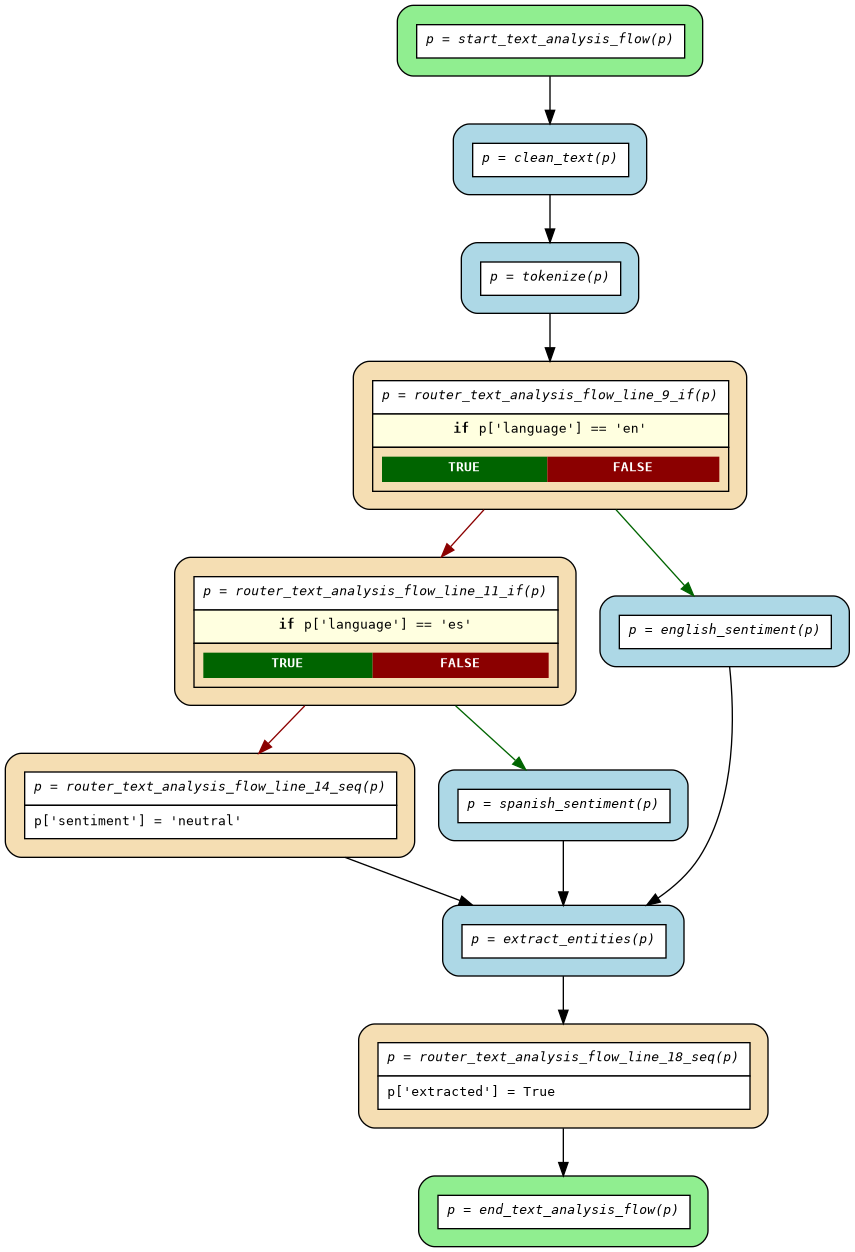
Flow Structure:
- Entrypoint:
start_{flowname}- Generated actor that starts the flow - Routers:
router_{flowname}_line_{N}_{type}- Control flow logic (conditions, mutations) - Exitpoint:
end_{flowname}- Generated actor that completes the flow - Handlers: Your ML/data processing functions (deployed as separate actors)
Key Features:
- Write in familiar Python syntax
- Inline payload mutations (
p["key"] = value) - Conditional routing (
if/elif/else) - Early returns for validation
- Automatic router generation
- Flow visualization
Compiling Flows
Install asya-cli to compile flows:
# Install asya-cli
# (or: `uv pip install ...`)
pip install git+https://github.com/deliveryhero/asya.git#subdirectory=src/asya-cli
Compile your flow:
# Basic compilation
# (or: uv run asya flow ...)
asya flow compile text_analysis_flow.py --output-dir ./compiled/

# With visualization (requires graphviz for PNG)
asya flow compile text_analysis_flow.py --output-dir ./compiled/ --plot

# Options:
#   --verbose, -v              Show verbose output
#   --plot                     Generate flow.dot and flow.png
#   --plot-width WIDTH         Maximum width for node labels (default: 50)
#   --overwrite               Overwrite existing output directory
#   --disable-infinite-loop-check  Skip infinite loop detection
Generated Files:
compiled/
├── routers.py       # Generated router actors (Python)
├── flow.dot         # Flow diagram (GraphViz format)
└── flow.png         # Flow visualization (if --plot enabled)
Example Output:
$ asya flow compile text_analysis_flow.py --output-dir ./compiled/ --plot
[+] Successfully compiled flow to: compiled/routers.py
[+] Generated graphviz dot file: compiled/flow.dot
[+] Generated graphviz png plot: compiled/flow.png
Understanding Generated Routers
The compiler generates control-flow routers from your flow definition. Example from if_else_simple.py:
Source Flow:
def sample_flow(p: dict) -> dict:
    p = handler_setup(p)
    if p["type"] == "A":
        p["branch"] = "A"
        p = handler_type_a(p)
    else:
        p = handler_type_b(p)
        p["branch"] = "B"
    p = handler_finalize(p)
    return p
Generated Flow:
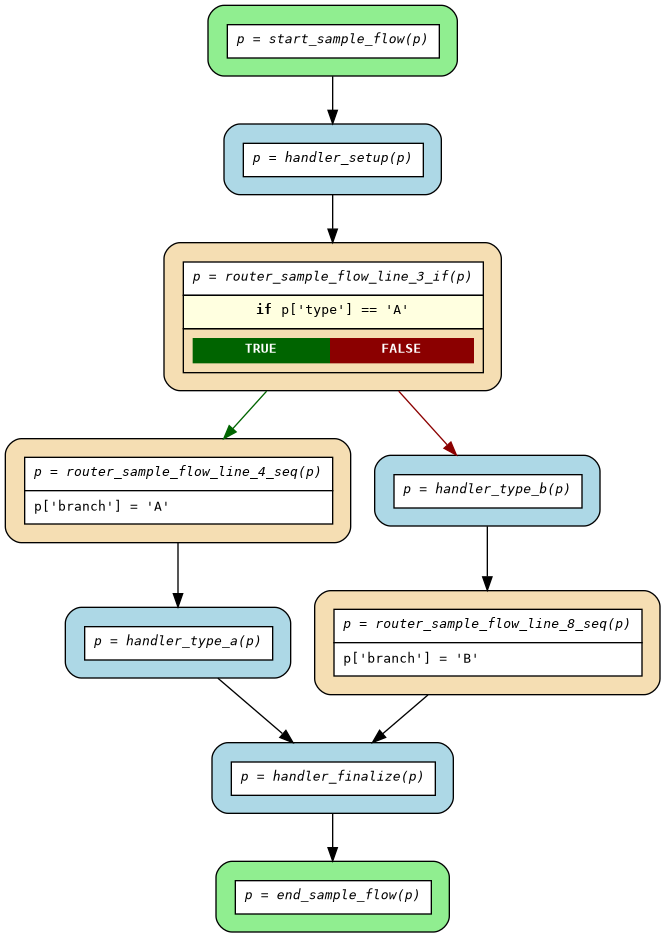
Generated Routers (see compiled/routers.py):
start_sample_flow- Flow entrypoint, routes to first handlerrouter_sample_flow_line_3_if- Conditional branching on line 3router_sample_flow_line_4_seq- Sequential mutations for "A" branchrouter_sample_flow_line_8_seq- Sequential mutations for "B" branchend_sample_flow- Flow exitpoint
Key Generated Functions:
# Entrypoint - starts the flow
def start_sample_flow(envelope: dict) -> dict:
    """Entrypoint for flow 'sample_flow'"""
    r = envelope['route']
    c = r['current']

    # Insert first handler and conditional router
    r['actors'][c+1:c+1] = [
        resolve("handler_setup"),
        resolve("router_sample_flow_line_3_if")
    ]
    r['current'] = c + 1
    return envelope

# Conditional router - branches based on payload
def router_sample_flow_line_3_if(envelope: dict) -> dict:
    """Router for control flow and payload mutations"""
    p = envelope['payload']
    r = envelope['route']
    c = r['current']
    _next = []

    if p['type'] == 'A':
        _next.append(resolve("router_sample_flow_line_4_seq"))
    else:
        _next.append(resolve("handler_type_b"))
        _next.append(resolve("router_sample_flow_line_8_seq"))

    r['actors'][c+1:c+1] = _next
    r['current'] = c + 1
    return envelope
Handler Resolution System
Generated routers use resolve() to map handler names to actor names via environment variables:
# In generated routers.py
resolve("handler_setup")  # Maps to actor name via env vars
How it works:
1. Routers reference handlers by name: resolve("handler_type_a")
2. At runtime, resolve() looks up ASYA_HANDLER_{ACTOR_NAME} environment variables
3. Supports suffix matching - use shortest unambiguous suffix:
# Environment variable format:
ASYA_HANDLER_MY_ACTOR="full.module.path.ClassName.method"

# All of these work (if unambiguous):
resolve("method")                              # Shortest suffix
resolve("ClassName.method")                    # Class + method
resolve("module.ClassName.method")             # Partial path
resolve("full.module.path.ClassName.method")   # Full path
Example:
# Your handler deployments:
ASYA_HANDLER_SENTIMENT_EN="sentiment.EnglishSentiment.process"
ASYA_HANDLER_SENTIMENT_ES="sentiment.SpanishSentiment.process"

# In router deployment:
ASYA_HANDLER_SENTIMENT_EN="sentiment.EnglishSentiment.process"
ASYA_HANDLER_SENTIMENT_ES="sentiment.SpanishSentiment.process"

# resolve() maps:
resolve("EnglishSentiment.process") -> "sentiment-en"
resolve("SpanishSentiment.process") -> "sentiment-es"
Deployment
Deploy generated routers and handler actors as regular AsyncActor CRDs.
Step 1: Build Router Image
Package compiled routers in a Docker image:
FROM python:3.13-slim
WORKDIR /app
COPY compiled/routers.py /app/routers.py
CMD ["python3", "-c", "import routers; print('Routers loaded')"]
docker build -t my-flow-routers:v1 .
Step 2: Deploy Router Actors
⚠️ Automatic generation of deployed charts is coming soon as part of extended functionality to easy deploying any actor by Data Scientists using asya-cli tool.
Deploy each generated router as an AsyncActor. IMPORTANT: Set handler mappings in environment variables:
apiVersion: asya.sh/v1alpha1
kind: AsyncActor
metadata:
  name: start-text-analysis-flow
spec:
  transport: sqs
  workload:
    kind: Deployment
    template:
      spec:
        containers:
        - name: asya-runtime
          image: my-flow-routers:v1
          env:
          # This router's handler
          - name: ASYA_HANDLER
            value: "routers.start_text_analysis_flow"
          - name: ASYA_HANDLER_MODE
            value: "envelope"

          # Handler-to-actor mappings (for generated `resolve()` function)
          # User handlers - map function names to deployed actor names
          - name: ASYA_HANDLER_CLEAN_TEXT
            value: "text_handlers.clean_text"
          - name: ASYA_HANDLER_TOKENIZE
            value: "text_handlers.tokenize"
          - name: ASYA_HANDLER_ENGLISH_SENTIMENT
            value: "sentiment.EnglishSentiment.process"
          - name: ASYA_HANDLER_SPANISH_SENTIMENT
            value: "sentiment.SpanishSentiment.process"
          - name: ASYA_HANDLER_EXTRACT_ENTITIES
            value: "nlp.extract_entities"

          # Router handlers - map router function names to deployed actor names
          - name: ASYA_HANDLER_ROUTER_TEXT_ANALYSIS_FLOW_LINE_10_IF
            value: "routers.router_text_analysis_flow_line_10_if"
          - name: ASYA_HANDLER_ROUTER_TEXT_ANALYSIS_FLOW_LINE_15_SEQ
            value: "routers.router_text_analysis_flow_line_15_seq"
          # ... (add mappings for all generated routers)
---
# Deploy other routers similarly
# All routers share the same handler mappings (user + router functions)
apiVersion: asya.sh/v1alpha1
kind: AsyncActor
metadata:
  name: router-text-analysis-flow-line-10-if
spec:
  transport: sqs
  workload:
    kind: Deployment
    template:
      spec:
        containers:
        - name: asya-runtime
          image: my-flow-routers:v1
          env:
          - name: ASYA_HANDLER
            value: "routers.router_text_analysis_flow_line_10_if"
          - name: ASYA_HANDLER_MODE
            value: "envelope"
          # Same handler mappings as above (both user handlers AND router functions)
          - name: ASYA_HANDLER_CLEAN_TEXT
            value: "text_handlers.clean_text"
          - name: ASYA_HANDLER_TOKENIZE
            value: "text_handlers.tokenize"
          - name: ASYA_HANDLER_ROUTER_TEXT_ANALYSIS_FLOW_LINE_10_IF
            value: "routers.router_text_analysis_flow_line_10_if"
          # ... (repeat all mappings)
Step 3: Deploy Handler Actors
Deploy your ML/data processing handlers as regular actors:
apiVersion: asya.sh/v1alpha1
kind: AsyncActor
metadata:
  name: english-sentiment
spec:
  transport: sqs
  scaling:
    minReplicas: 0
    maxReplicas: 10
    queueLength: 5
  workload:
    kind: Deployment
    template:
      spec:
        containers:
        - name: asya-runtime
          image: my-sentiment-model:latest
          env:
          - name: ASYA_HANDLER
            value: "sentiment.EnglishSentiment.process"
          resources:
            limits:
              nvidia.com/gpu: 1  # GPU for ML models
Deployment Tip: See examples/flows/compiled/ for complete examples. Platform teams can automate deployment chart generation (coming soon).
Flow DSL Syntax Summary
See flow examples and their compiled code.
Supported:
- Actor calls:
p = handler(p) - Payload mutations:
p["key"] = value,p["count"] += 1 - Conditionals:
if/elif/else, nested conditions - Early returns:
if error: return p - Complex expressions:
p["result"] = p["x"] + p["y"] * 2 - Class instantiation:
classifier = TextClassifier()(default args only)
Not Supported (use envelope mode instead):
- Loops (
for,while) - Custom routing logic
- Multiple assignments:
p, q = handler(p) - Non-default constructor arguments
Class Handler Example in Flows:
def my_flow(p: dict) -> dict:
    # Instantiate with default args only
    classifier = TextClassifier()

    # Use instance
    p = classifier.process(p)

    return p
When to Use Flow DSL
✅ Good for:
- Linear pipelines with branching
- Data enrichment workflows
- Preprocessing → Model → Postprocessing patterns
- Validation and conditional processing
- ML inference pipelines
❌ Not suitable for:
- Dynamic routing based on state outside of
p(need to implement branching inside your actor in envelope mode) - Iterative processing (loops support coming soon)
Complete Example: ML Pipeline
Write Flow (ml_pipeline_flow.py):
def ml_pipeline_flow(p: dict) -> dict:
    # Validation
    p = validate_input(p)
    if not p.get("valid", False):
        p["error"] = "Invalid input"
        return p  # Early exit to end_ml_pipeline_flow

    # Preprocessing
    p = normalize_data(p)
    p = extract_features(p)
    p["preprocessed"] = True

    # Model selection
    if p["model_type"] == "fast":
        p = lightweight_model(p)
    elif p["model_type"] == "accurate":
        p = deep_model(p)
    else:
        p["error"] = "Unknown model type"
        return p

    # Postprocessing
    p = format_results(p)
    p["pipeline_complete"] = True

    return p
Compile:
asya flow compile ml_pipeline_flow.py --output-dir ./compiled/ --plot
Generated Routers:
start_ml_pipeline_flow- Entry routerrouter_ml_pipeline_flow_line_4_if- Validation checkrouter_ml_pipeline_flow_line_13_if- Model selectionend_ml_pipeline_flow- Exit router
Visualize: Open compiled/flow.png to see the control flow diagram.
Deploy: Package routers and handlers, deploy as AsyncActor CRDs (see examples/flows/compiled/README.md for complete deployment examples).
See Flow Compiler Architecture for complete documentation and examples/flows/ for more flow examples.
Advanced: Envelope Mode (Dynamic Routing)
Use case: AI agents, LLM judges, conditional routing based on model outputs.
Envelope mode gives you full control over the routing structure:
env:

- name: ASYA_HANDLER_MODE
  value: "envelope"  # Receive full envelope, not just payload
# llm_judge.py
class LLMJudge:
    def __init__(self, threshold: float = 0.8):
        self.model = load_llm("/models/judge")
        self.threshold = float(threshold)

    def process(self, envelope: dict) -> dict:
        # Envelope structure:
        # {
        #   "id": "...",
        #   "payload": {...},  # Your data
        #   "route": {
        #     "actors": ["preprocessor", "llm-judge", "postprocessor"],
        #     "current": 1  # Points to current actor (llm-judge)
        #   }
        # }

        payload = envelope["payload"]

        # Run LLM judge
        score = self.model.judge(payload["llm_response"])
        payload["judge_score"] = score

        # Dynamically modify route based on score
        route = envelope["route"]
        if score < self.threshold:
            # Low quality response - add refinement step
            route["actors"].insert(
                route["current"] + 1,  # After current position
                "llm-refiner"  # Extra step
            )

        # Increment current pointer
        route["current"] += 1

        return envelope
Important: Route modification rules:
- ✅ Can add/replace future steps
- ✅ Can insert actors after current position
- ❌ Cannot modify already-processed steps
- ❌ Cannot change which actor
route.currentpoints to
Error Handling
Asya automatically handles exceptions:
def process(payload: dict) -> dict:
    if "required_field" not in payload:
        raise ValueError("Missing required_field")

    # Normal processing
    result = do_work(payload["required_field"])
    return {**payload, "result": result}
When exception occurs:
1. Runtime catches exception and creates error envelope with traceback
2. Sidecar routes to asya-{namespace}-error-end queue
3. Error-end actor persists error details to S3
4. Gateway receives final failure status
No manual error handling needed - framework handles everything.
Monitoring
Your platform team will set up monitoring dashboards. For quick checks:
Note: More comprehensive monitoring capabilities (dashboards, alerts, metrics) are coming soon. Ask your platform team about current monitoring setup.
Advanced: kubectl commands (optional)
# View actor status
kubectl get asya text-processor

# Watch autoscaling
kubectl get hpa -w

# View logs
kubectl logs -f deploy/text-processor

# View sidecar logs (routing, errors)
kubectl logs -f deploy/text-processor -c asya-sidecar
Next Steps
- Read Core Concepts
- See Architecture Overview
- Explore Example Actors
- Learn about Envelope Protocol